The OpenROAD ASIC design automation toolchain offers a reduction in turnaround time as well as better risk mitigation and flexibility, leading to increasing commercial interest in this open source flow. With more customer projects comes a diversity of designs, opening up more opportunities to optimize and extend OpenROAD as a means to automate and accelerate the path from RTL to tapeout even further.
OpenROAD comes equipped with AutoTuner, which helps automate the search for right parameter values. The AutoTuner module adjusts design and algorithm parameters by optimizing a cost function. AutoTuner relies on the Ray framework, utilizing its optimization algorithms.
This article presents how Antmicro improved OpenROAD’s AutoTuner module to speed up the search process by implementing multi-objective search based on Google’s Vizier framework, as well as other improvements. As a result, the Power, Performance, and Area (PPA) metrics of the ASIC designs were optimized while promoting a diversity of solutions to choose from. A separate section will show you how to use the enhanced AutoTuner module.
The challenges of automated search for design parameters
To find the best solution for a given design, you are required to adjust such parameters as placement density or core utilization, which in turn influence OpenROAD flow algorithms like synthesis, floorplan, placement, Clock Tree Synthesis (CTS), or routing. The aim is to create the most efficiently placed layout. To automate the process of finding the right parameter values, you can set up an optimization algorithm that will adjust parameters based on such design metrics as the following:
- Difference of clock periods and Worst Negative Slack (minimize)
- Total power (minimize)
- Core utilization (maximize)
- Final utilization (maximize)
- Design area (minimize)
- Core area (minimize)
- Die area (minimize)
So far, the AutoTuner framework has been optimizing a single metric or a function aggregating the values of several of the above metrics by using a handcrafted formula (e.g. a weighted sum) representing PPA. For the optimization, it has been using algorithms like grid search or Bayesian optimization.
However, aggregating those metrics inevitably poses further challenges:
- Metrics have different units.
- Metrics have different, often not trivially deducible characteristics.
- Some metrics may bias the aggregated function.
- Some metrics may be too small compared to others to influence the function.
Considering metrics independently: multi-objective optimization
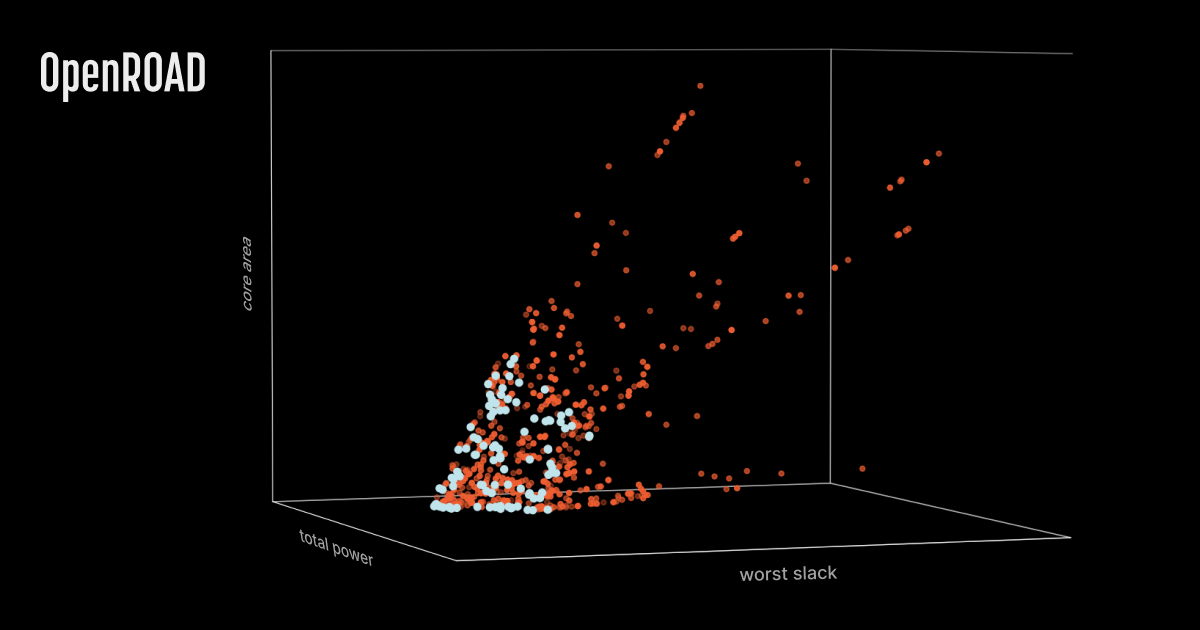
To lift the burden of preparing and adjusting AutoTuner’s cost function, Antmicro proposes a different approach: parallelizing the design search and producing more diverse solutions focusing on the various considered metrics independently. This can be done using multi-objective optimization based on the NSGA-II evolutionary algorithm.
In this approach, no typical single-value function to optimize exists because all metrics are considered independently. This way, the algorithm compares the created designs and picks the better ones with respect to at least one of the metrics selected by the user. The design solutions identified by the algorithm by using this method are described as non-dominated.
For each iteration, the algorithm creates a “population” of designs - a set of several designs built in parallel. Next, it picks a set of non-dominated solutions from the population. The designs that are worse in all aspects compared to any of the remaining designs won’t be considered (since those are dominated). Having only non-dominated solutions, the algorithm picks the most diverse ones and stores them as the currently best solutions. In a later phase, referred to as “mutation”, the algorithm applies minor changes to the best set of solutions and then builds and evaluates them.
Over time, in the process of creating new populations by mutating the most promising solutions, the algorithm should deliver increasingly better designs. In the end, the final population of best-performing models is filled with designs that excel in one or more metrics selected by the user.
Introducing Google’s Vizier to AutoTuner
The implementation of the NSGA-II algorithm that we used in AutoTuner comes from Google’s open source Vizier framework for deploying optimization tasks using various optimization algorithms.
In the process of integration, we made the existing code more reusable by splitting it into multiple files, and established a Python project structure to enable features like introducing optional dependencies and using AutoTuner as a module. As a result, Vizier is integrated as a separate AutoTuner flow, with a distinct entry point and optional dependencies, but compatible with the original configuration format.
In addition to the Vizier integration, the --stop-stage argument was added, allowing for building designs only up to a specified stage, reducing the run time. This feature works both for Vizier and the original Ray Tune optimization.
The implemented integration can be found in an ongoing pull request.
Handling invalid parameters, floorplanning core utilization, and stage caching
When working on the auto-tuning of the design parameters, Antmicro also took into account the problem of choosing invalid parameters, as doing so can hinder the entire search process, yielding significantly fewer working designs. Considering that errors may appear in the very late stages of layout creation, penalizing the selection of parameters that may lead to failure is crucial. For example, failures during the floorplan stage were strongly correlated with the core utilization being too high. Therefore, in such scenarios, the core utilization metric is multiplied by -1 to suggest it should be minimized for the floorplanning to finish.
Additionally, we introduced the last_successful_stage artificial objective, which is maximized by the algorithm. It describes the furthest stage the design with given parameters was able to achieve in numerical format. This objective encourages the algorithm to promote designs and parameters that are increasingly more valid.
Apart from that, since the core utilization and area are unlikely to influence the synthesis stage, the designs can be synthesized once and later reused for each run to save time. To take advantage of this, Antmicro implemented a stage result caching feature for OpenROAD’s AutoTuner that works for optimization with both Vizier and Ray Tune. When enabled, a specified stage is built before the optimization and copied to each flow variant before it’s run.
The speedup of the AutoTuner search here depends heavily on how time-consuming the cached stage is compared to other stages. For example, as benchmarked with four builds run in parallel, the average speedup per iteration of the core of the OpenROAD-flow-scripts JPEG Encoder can rise up to 7 minutes when caching up to the CTS stage.
Using the improved AutoTuner module
To use the Vizier-based AutoTuner, first clone the fork with the implemented AutoTuner by running the following command:
git clone --recursive git@github.com:antmicro/OpenROAD-flow-scripts.git -b autotune-vizierThen, either follow instructions on installing dependencies with the OpenROAD Flow Scripts User Guide or use a built Docker image as follows:
docker run --rm -w $(pwd) -v $(pwd):$(pwd) -it openroad/orfs:latestThis should fetch the newest available Docker image with the ORFS environment. Next, in the Docker environment, set up the ORFS variables with the following command:
source /OpenROAD-flow-scripts/env.shSubsequently, install necessary AutoTuner packages for the included fork:
# Install prerequisites for AutoTuner
./tools/AutoTuner/installer.sh

# Start a virtual environment
source ./tools/AutoTuner/setup.sh
After configuring the environment, define the autotuner.json configuration for supported ranges and steps of different design parameters as shown below:
{
    "_SDC_FILE_PATH": "constraint.sdc",
    "_SDC_CLK_PERIOD": {"type": "float", "minmax": [0.8, 5.0], "step": 0},
    "CORE_UTILIZATION": {"type": "int", "minmax": [20, 50], "step": 1},
    "CORE_ASPECT_RATIO": {"type": "float", "minmax": [0.5, 2.0], "step": 0},
    "CORE_MARGIN": {"type": "int", "minmax": [1, 3], "step": 1},
    "CELL_PAD_IN_SITES_GLOBAL_PLACEMENT": {"type": "int", "minmax": [0, 3], "step": 1},
    "CELL_PAD_IN_SITES_DETAIL_PLACEMENT": {"type": "int", "minmax": [0, 3], "step": 1},
    "_FR_LAYER_ADJUST": {"type": "float", "minmax": [0.1, 0.3], "step": 0},
    "PLACE_DENSITY_LB_ADDON": {"type": "float", "minmax": [0.0, 0.2], "step": 0},
    "CTS_CLUSTER_SIZE": {"type": "int", "minmax": [10, 200], "step": 1},
    "CTS_CLUSTER_DIAMETER": {"type": "int", "minmax": [20, 400], "step": 1},
    "_FR_FILE_PATH": "../../../platforms/sky130hd/fastroute.tcl"
}
Afterwards, place such a configuration in a directory with the target design (e.g. gcd): ../../flow/designs/sky130hd/gcd/autotuner.json.
In the end, run the search for optimal design parameters using the following commands:
cd tools/AutoTuner
python3 -m autotuner.vizier \
    --design gcd --platform sky130hd \
    --config ../../flow/designs/sky130hd/gcd/autotuner.json
Once the tool finishes its work, you can find the results in ../../flow/results/sky130hd/gcd/test-<date>, where each generated solution has its own directory with all necessary files. The optimization summary can be found in the ./results.json file.
For a list of additional arguments for the script, see the List of input arguments section.
Adopt and optimize OpenROAD for fast-turnaround ASIC design feedback
The OpenROAD flow helps increase the productivity of digital design teams by providing fast-turnaround feedback on their designs. With increasing adoption in state-of-the-art industrial projects, Antmicro is seeing interest in performance improvement and optimization for large-scale designs from customers. Some of our other recent developments around OpenROAD include efficient power analysis using the Switching Activity Interchange Format, automatic clock gating, or improved resynthesis with simulated annealing.
Antmicro can help you adopt the flow and adjust and optimize it for your use cases to speed up the ASIC design process and eliminate bottlenecks. We also offer a range of other dedicated ASIC and FPGA tools and verification options. Reach out to us at contact@antmicro.com to discuss the needs of your project.