Digital to Analog Converters (DACs) are an essential part of modern communication systems requiring high-speed data conversion, such as cellular base stations and Direct Digital Synthesis (DDS) instruments, where signal accuracy is paramount. An eye diagram is a valuable tool for evaluating signal integrity, allowing engineers to assess the quality of the signal at a glance, just by looking at the shape of the “eye”, but also providing detailed information that can be useful for troubleshooting or optimizing the system.
In a recent project, Antmicro developed a Python-based tool for verifying signal integrity of DAC3xJ8x devices, allowing users to trigger an eyescan, i.e. the process of collecting data and generating eye diagrams. The DAC eyescan tool can be used from the command line interface, which makes it easy to integrate with automatic testing tools, such as our open source Protoplaster framework.
In this article we will describe the eyescan testing tool and its integration with Protoplaster, and show you how to configure tests and extract and visualize the results, using a DAC38j8x device as an example.
Eyescan testing
The eyescan tool conducts a SerDes (Serializer/Deserializer) test of the DAC device, using a JTAG interface to configure the test and extract the results from the DAC. The test is run for voltage offsets in the -320 to 310 mV range and phase offset in the -0.5 to 0.5 UI range with 1/32 increments. The output is aggregated in a TSV file (Tab Separated Values), containing information about lane number, bit number, voltage offset, phase offset and the amplitude readout:
0       7       31      16      4095
1       7       31      16      4095
2       7       31      16      4095
3       7       31      16      4095
The testing setup uses JTAG (IEEE 1149.1) along with a testing wrapper (IEEE 1500) to conduct an eyescan test. Our solution allows us to test multiple DACs connected in a daisy-chain configuration. The script is able to test a single DAC device in a daisy-chain at a time by indicating how many devices are in the chain and which one should be tested.
The IEEE 1149.1 standard defines how JTAG daisy-chain communication should work. Each device in the chain can be bypassed using the BYPASS instruction. In case of the DAC38j8x, this instruction is defined as 0xFF. To run a test on one DAC in the chain, all other devices should be configured into the bypass mode. When in bypass mode, a device passes all incoming data from input (TDI) to output (TDO) with a 1 bit offset.
While this approach of bypassing unused devices has worked when accessing the last DAC in the chain, we’ve encountered issues when accessing other devices in the chain. After setting the instruction register of a DAC to 0x6D, which is defined as “setup an IEEE 1500 IR transaction”, the device stops passing along the BYPASS instructions to other devices. This was causing the following devices to remain in a non-bypass state, hence not passing the results from the tested DAC correctly.
After sending all possible instructions (0x00-0xff), we managed to identify a single instruction that triggered the DACs to start responding again. That instruction is 0xBE, and after sending it, the DACs start to pass the IR data correctly, allowing us to bypass the devices again. As far as we know, the instruction is not documented in any Eyescan related manual, so we called it RESET_STATE_COMMAND.
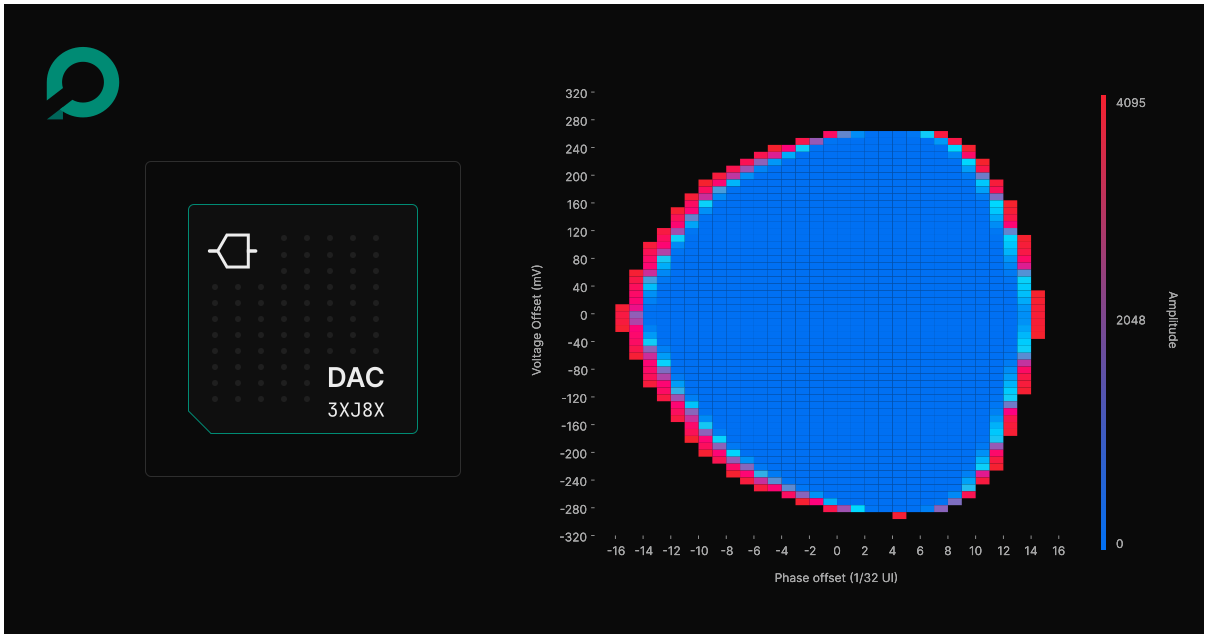
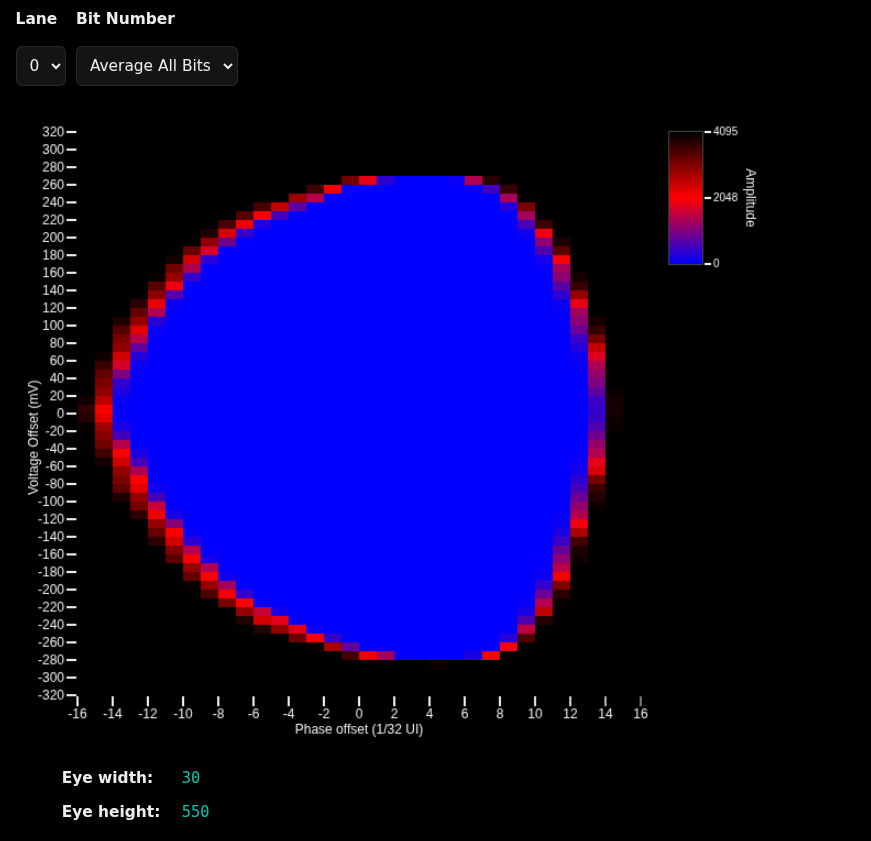
The output is then parsed and visualized in a static HTML file. The HTML file contains an eye diagram and two dropdown lists for switching between diagrams generated for each lane and bit number. The HTML file also contains eye height and width values that are calculated as the maximal distance between minimal values on both axes. This diagram can be used by a designer to decide whether the input parameters of the DAC satisfy the requirements, which can be arbitrary, depending on the use case.
Optimization
In an effort to reduce execution time, we replaced the initial bit-banged JTAG implementation with the Multi-Protocol Synchronous Serial Engine (MPSSE), which enables faster communication with the DACs. This change also removes the need to decode bit-banged data received from the FTDI interface, further improving execution time. As a result, overall execution speed increased significantly.
Integration with Protoplaster
To automate the testing procedure, we integrated the DAC eyescan tool with Protoplaster, Antmicro’s platform testing framework. Protoplaster is able to perform the entire eyescan test procedure using the eyescan tool, and generate an eye diagram based on the data output by the tool. The Protoplaster test is also able to verify the eye width and height by checking if the resulting width and height are in the specified ranges.
To run the eyescan test with Protoplaster, it needs to be added to the Protoplaster config file, providing the following parameters:
ftdi_dev- FTDI device number.bit- Number of bits that are checked in the eyescan test.eyescan_output- Output file of the eyescan test in the TSV (Tab Separated Values) format.eyescan_diagram- A static HTML file containing the eye diagram produced by the test.min_widthandmax_width- Expected range of the eye width.min_heightandmax_height- Expected range of the eye height.
For more information about using Protoplaster, refer to its README.
Testing a DAC38j8x device
An example Protoplaster eyescan test config for a DAC38j8x device is shown below:
tests:
  dac_eyescan:
    tests:
      - ti_dac38j8x_eyescan:
          pyftdi_url: "ftdi:///1"
          ftdi_jtag_frequency: 2000000
          test_pattern: PRBS_7_BIT
          dwell_time: 0.01
          sample_rate: 12000000000
          daisy_chain_count: 18
          daisy_chain_number: 2
          eyescan_output: "output.tsv"
          eyescan_diagram: "eye_diagram.html"
          bit: 20
          min_width: 28
          max_width: 32
          min_height: 540
          max_height: 560
This test will produce output.tsv with raw, tab-separated eyescan data, and eye_diagram.html, the resulting static HTML containing the eye diagram, as shown below.
For an interactive version of the diagram, visit the desktop version of the website.
Automated signal quality verification with Antmicro
Eyescan analysis provides valuable information not only for DACs, but also high-speed interfaces such as PCIe or NVMe, and across various industries, including telecommunications, automotive and space. By combining eyescan verification with our Protoplaster framework, commercial projects developed with Antmicro benefit from a comprehensive workflow for automated, CI-driven signal quality testing at scale. We also employ a signal integrity simulation workflow with eye diagrams during hardware development, ensuring comprehensive testing of our complex, multi-layer PCB designs before they’re manufactured.
If you would like to learn more about Antmicro’s engineering services or are interested in integrating the eyescan tool and Protoplaster into your workflow, reach out to us at contact@antmicro.com.