Antmicro has been an active contributor to the Zephyr Project for many years. The open source Zephyr RTOS continues to gain popularity, and we are committed to further extending Zephyr’s reach by helping improve it and add additional features. An example of a feature that is being actively worked on by the community is adding USB Host support. Within this issue, work is underway for developing support for a number of USB classes, such as MSC (Mass Storage Class), CDC ECM (Communication Device Class Ethernet Control Model), or HUB.
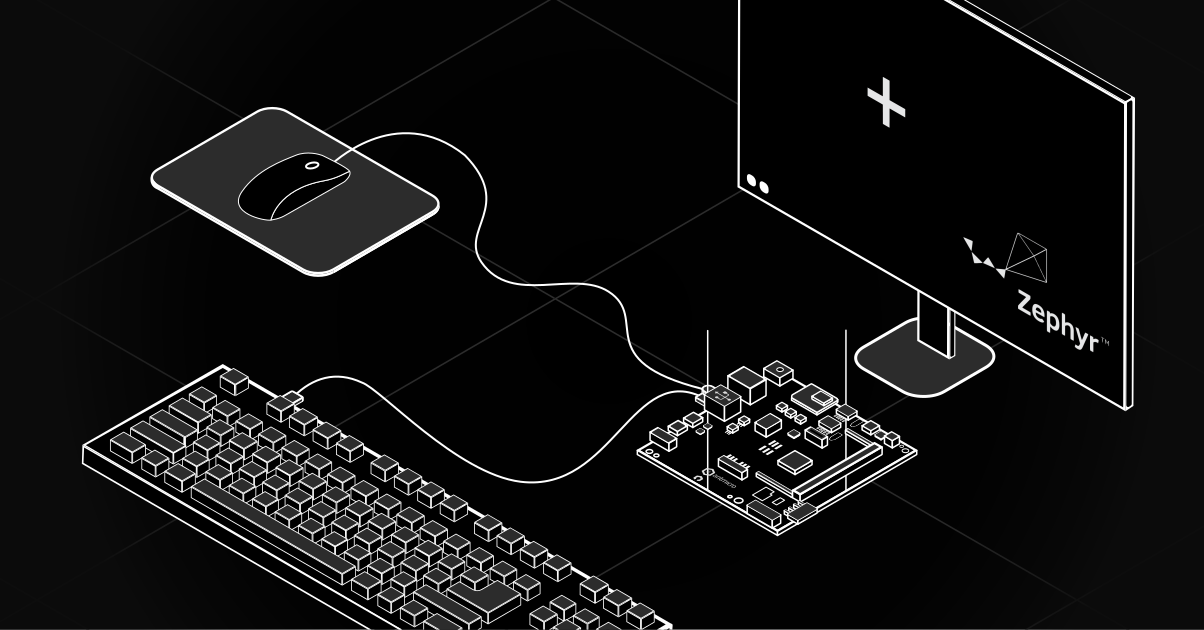
Antmicro is contributing to the development of USB support in Zephyr by implementing HID Boot support. USB human interface devices (HID) are a type of computer device that receives input from a human - keyboards, touchpads, controllers, and similar devices. Within HID there is a subclass of devices called HID Boot Devices. They form their own subclass because they are extremely useful for the pre-OS environment, allowing the user to edit their BIOS settings as this subclass introduces support for generic mice and keyboards. This article describes our additions to Zephyr’s USB Host subsystem, our HID Boot driver, as well as demonstrates how to build a test setup for connecting a mouse to a device running Zephyr.
Implementing the groundwork for HID Boot
Low Speed is a class of devices that do not require large data transfers, allowing to save power and minimize signal noise; and it is a class used for HID Boot devices. Previously, Zephyr supported Fast Speed class devices only. In order to implement it, we added a necessary prerequisite, that being multi-packet transfers.
Low Speed devices accept a maximum packet size of 8 bytes, which is not enough to send the USB device configuration descriptor over USB, and therefore, they would not be able to work in Zephyr. To remedy that, we implemented multi-packet transfers, which allow for transfer of data exceeding the maximum packet size by sending it through multiple packets. This feature, although not specific to Low Speed devices, serves as a good way to configure devices that have a maximum packet size smaller than their configuration descriptor size.
Additional transfer features
Another feature we added is giving Zephyr the ability to receive interrupt transfers. These are a reliable and low-latency way for HID Boot devices to send small bits of data in regular intervals.
Zephyr did not support these transfers previously (only bulk and control transfers were supported), and had no existing ways to schedule or reschedule transfers. Therefore, we implemented scheduling and rescheduling, allowing for better functionality of interrupt transfers.
To further explain what that entails: scheduling allows for enqueuing a USB transfer that should not be processed immediately - this can be used for any transfer type, but is a requirement for interrupt and isochronous transfers because of the need to complete them within specified intervals. Rescheduling is used to ensure we are making the correct number of transfers, even when delays or errors occur.
Additionally, we implemented prioritization of interrupt transfers over control or bulk transfers in order to make sure the interrupt transfer is handled within its set interval. As a bonus, our additions to the transfer system allow for easier implementation of isochronous transfers in the max3421e driver (this driver being for the USB Host controller) in the future - those could be used for transporting data such as audio or video over USB.
HID Boot Class driver
With the mentioned elements in place, we were able to write a generic driver for the HID Boot Class. The driver is implemented as a USB class in Zephyr’s USB host subsystem, ensuring that all appropriate devices will be automatically routed to it. When a new device is connected, the driver will automatically send a SET_IDLE request - telling the device to send reports only when a new event occurs. That allows the driver to have smaller CPU usage, which is a great feature for running it on embedded devices.
After the SET_IDLE request, the driver adds the periodic interrupt transfer we implemented in order to start polling the device for new events. Each new report is parsed according to the report description defined in the HID Standard, and then all the events that occurred (such as key presses, mouse movements etc.) are extracted. At the end, all of the events are reported through the input subsystem. This allows applications or subsystems interested in the occurred events to easily access them in a generic way.
As a result of adding all the features we described so far, Zephyr will be able to support a much wider range of devices, and allow for usage of almost any off-the-shelf mice and keyboards, since the majority of them are classified as Low Speed devices.
Building the test setup
We will now demonstrate building a test set-up similar to our sample video seen below.
For setting up the development environment, first follow the official instructions.
When following the instructions, in the Get Zephyr and install Python dependencies section, instead of running west init ~/zephyrproject, use the following command: west init -m https://github.com/antmicro/zephyr.git --mr hid-boot-support ~/zephyrproject.
Afterwards, go into the directory with the sample:
cd ~/zephyrproject/zephyr/samples/subsys/usb/host_hid_mouse_displayIf you have not yet activated the Python virtual environment, do so with the following command:
source ~/zephyrproject/.venv/bin/activateBuild the sample:
west build -b stm32h747i_disco/stm32h747xx/m7 --shield sparkfun_max3421e --shield st_b_lcd40_dsi1_mb1166_a09 .We recommend using the SparkFun MAX3421E shield, as it is already available in Zephyr. In the sample video, we used a MAX3421E shield from Adafruit.
Depending on your version of the STM32H747I Discovery board, you might need to use a different display shield. Refer to the official documentation for more information.
Then, flash the application to your board:
west flashAfter these steps, you should have a working sample. Connect the mouse and move it - you should see the cursor moving on the screen.
Design and customize embedded devices with Zephyr RTOS
Antmicro is actively involved in developing new features for Zephyr to widen the scope of its use cases. With support for USB keyboards and mice, Zephyr could be a great solution for embedded devices that require human input. Those could be either generic, off-the-shelf mice and keyboards, or any devices that present themselves as such, like keypads or barcode readers.
Find out how Antmicro helps product companies develop a complete device running Zephyr RTOS, design tailored fleet management systems based on our open source RDFM framework, and reach out to us at contact@antmicro.com.